11g comes with quite a number of demo schemas (seeded tables which can be queried to understand /Learn various SQL commands). To know more about it, go to: Download Oracle Schema
Scott User which used to come unlocked and OPEN in every version, is no longer the case. You need to manually unlock the user. To learn more about SCOTT Schema go to: http://wiki.oracle.com/page/scott%2Ftiger
To learn about installing Sample schemas in 10g, go to :- Installing Sample Schema's
Sample Schemas reside under $ORACLE_HOME/demo/schema. Demobld.sql resides under $ORACLE_HOME/sqlplus/demo
Monday, April 26, 2010


Saturday, April 24, 2010
SP2-0027 error in SQLPLUS
| Screen -1 |
 |
There is a lengthy discussion on resolving this at tom kyte's website - click here to go there. However, I ran the same script under SQLDeveloper, it worked! (Screen-2). Now, that's an easy solution :-)
| Screen -2 |
 |
Thursday, April 22, 2010
How to set login preferences (SQLDeveloper)?
| Screen-1 |
 |
To set login preference for goto Tools --> preferences; select database, click on browse to choose the login you have just created and you are done (see Screen -1 above).
After setting the preferences, I ran the following SQL: "exec DBMS_OUTPUT.PUT_LINE ('1234567890123456789012345678901234567890');" and ran the script. The script output window display is shown below (Screen -2). hmm, not what I expected.
| Screen -2 |
 |
| Screen -3 |
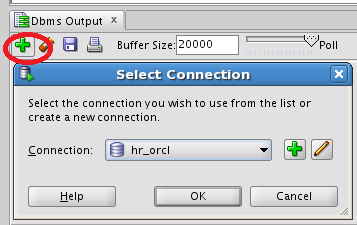 |
So, I ran the command SERVEROUTPUT manually and ran it - success! Unfortunately, Session parameters seems to be manually run each time a you run a script and does not get set automatically. you can see the results in (Screen -4).
| Screen -4 |
 |
How to set login preferences (for SQLPLUS)?
I am too lazy to keep setting debugging messages or pagesize for every session in SQLPLUS. Also, I would like to set the SQLPROMPT look much like the UNIX Prompt. There are essentially two places where I can do it. Either use a file glogin.sql (oracle creates a glogin.sql file - nothing but a shell - at $ORACLE_HOME/sqlplus/admin ) or create a login.sql at the directory where I start sqlplus.
Note: In order to change glogin, super user access is needed. If you do not have super user access, create a login.sql at a local directory.
To display debugging messages on, use SET SERVEROUTPUT ON
To set the output size (below 10g) SET SERVEROUTPUT ON SIZE 10000. (for 10g & above), it is "SET SERVEROUTPUT ON SIZE UNLIMITED
To set the sqlprompt, enter SET SQLPROMPT "Srini" - the value given between the double quotes is displayed as SQL Prompt. If you want it to be generic, then type, SET SQLPROMPT "_USER'@'_CONNECT_IDENTIFIER _PRIVILEGE >"
The above command displays the user, database name, connected (sysdba or normal)
Screen shot of my glogin.sql (Screen -1) is displayed below:
After modifying the login file, the effects are shown in the Screen -2 & Screen -3.
Note: If the SERVEROUTPUT is not set right, Oracle will raise ORA-20000 error as shown below (Screen -4):
References: To learn more about SQLPLUS commands click here
Note: In order to change glogin, super user access is needed. If you do not have super user access, create a login.sql at a local directory.
To display debugging messages on, use SET SERVEROUTPUT ON
To set the output size (below 10g) SET SERVEROUTPUT ON SIZE 10000. (for 10g & above), it is "SET SERVEROUTPUT ON SIZE UNLIMITED
To set the sqlprompt, enter SET SQLPROMPT "Srini" - the value given between the double quotes is displayed as SQL Prompt. If you want it to be generic, then type, SET SQLPROMPT "_USER'@'_CONNECT_IDENTIFIER _PRIVILEGE >"
The above command displays the user, database name, connected (sysdba or normal)
Screen shot of my glogin.sql (Screen -1) is displayed below:

After modifying the login file, the effects are shown in the Screen -2 & Screen -3.


Note: If the SERVEROUTPUT is not set right, Oracle will raise ORA-20000 error as shown below (Screen -4):


References: To learn more about SQLPLUS commands click here
Subscribe to:
Posts (Atom)